Sales roles have expanded, expectations have grown, and speed matters more than ever. Therefore, there’s no more basic and essential tool for modern sales teams than a Sales Force Automation software.
Furthermore, the solution should be mobile-first, AI-powered, and designed to cover the requirements of every role, from field reps to leadership.
It’s not that easy technically. Connecting field sales management, execution, and reporting in a single system is challenging, but Sales Force Automation benefits make the effort worthwhile for every role.
That’s exactly what we will examine in this article, including:
- How SFA improves efficiency and reduces stress for field reps
- How managers gain real-time visibility and control
- How HQ teams get accurate, actionable data for reporting and planning
- Examples of SFA in action across different sales roles
- Key takeaways for choosing an SFA solution for your organization
What Is Sales Force Automation (SFA)?
Sales Force Automation (SFA) is a software that captures field activities, synchronizes them with back-office systems, and reduces manual data-entry work.
Although it is designed to automate repetitive sales tasks (such as visit scheduling and capturing in-store execution data), it’s not a one-department solution. SFA connects sales, trade marketing, merchandising, and management into a single execution environment.
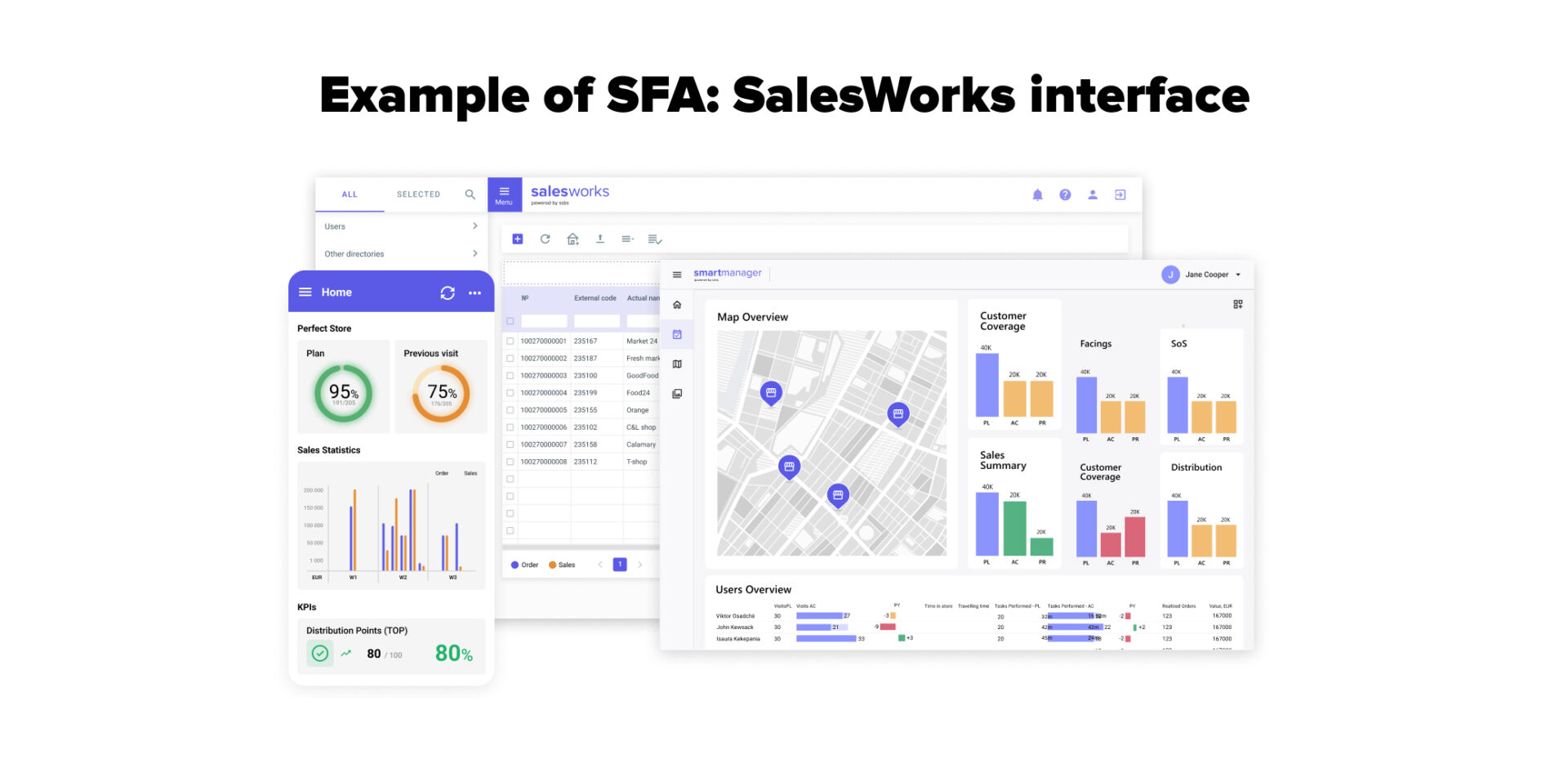
Each SFA solution (custom-built or off-the-shelf, web-based or mobile) typically covers core field-sales tasks. However, each also has its own strengths, limitations, and level of flexibility. Therefore, the right choice depends on how unique your processes are.
How does SFA differ from CRM?
These terms are often confused, so we will clarify their purposes before discussing Sales Force Automation benefits.
The primary focus of Sales Force Automation for FMCG, by definition, is to automate field-execution processes, such as visits and orders.
CRM’s focus lies on storing customer data and tracking customer interactions.
A CRM system can include basic SFA features, but eventually, a full-fledged SFA solution becomes necessary.
| SFA | CRM |
| Automates field-sales tasks | Manages customer relationships |
| Used by both reps in stores/outlets and office teams | Used by account managers and office teams |
| Focuses on execution: visits, orders, audits | Focuses on pipeline: lead management, deals, interactions, and customer experience |
| Ensures consistent in-store processes | Improves visibility of customer history and forecasts |
Levels of SFA Functioning
SFA operates on two levels: field and administrative.
- On the field level, it guides reps through visits, standardizes in-store tasks, and captures execution data.
- On the administrative level, it automates reporting, planning, and data synchronization.
Most SFAs eventually transition from standalone solutions to integrated hubs that link seamlessly with other systems, such as Shelf Image Recognition (IR), Distributor Management Systems (DMS), or tools used for the management of sales territory. This way, users can access broader functionality without having to leave the SFA platform.
How Sales Force Automation Boosts Efficiency and Productivity
SFA directly changes workflow for different levels of sales representatives, general management, trade marketing, finance, and even IT. But let’s first discuss the core ways Sales Force Automation benefits the organization as a whole.
The overall advantages of Sales Force Automation can be divided into three main categories:
- Automating routine administrative tasks
- Reducing human errors with centralized data
- Enhancing team productivity across departments
Automating Routine Administrative Tasks
Field teams no longer need to manually fill in reports or re-enter the same data into multiple systems. SFA automates time-consuming tasks, including visit reporting, order entry, stock checks, pricing updates, and basic analytics.
Reducing Human Errors with Centralized Data
With SFA, all sales, outlet, product, pricing, and promotion data are stored and updated in a single system. This eliminates discrepancies caused by spreadsheets, offline files, or duplicated inputs.
Automated validations (for pricing, assortment, or orders) help prevent mistakes at the point of execution.
Enhancing Team Productivity Across Departments
SFA can collect data from various sources and provide teams with a shared up-to-date view of sales, outlets, and execution information. With all those numbers in one place, teams no longer waste time reconciling reports or chasing updates.
These SFA benefits become especially evident in day-to-day fieldwork. Take SSBS’s SFA, SalesWorks, for example. Its built-in module with recommended steps for field visits proactively guides users through tasks. This way, it saves the time that used to be spent reporting issues to managers and waiting for instructions. Field reps can act immediately, complete all necessary actions, and record data accurately.

Furthermore, KPIs within an SFA system are shared across a single system, but are not one-size-fits-all. They reflect the specific conditions of each outlet, region, and territory (such as format, priorities, and local targets).
The shared yet contextual view removes confusion, speeds up planning, execution, and review cycles.
Benefits of Sales Force Automation Across Roles and Departments
SFA features can vary across platforms. Therefore, to illustrate the value of such software in practice for both commercial and field roles, we will showcase these benefits using our own SalesWorks solution as an example.
Sales Management (Managers and Supervisors)

SFA gives sales managers and supervisors full visibility into field execution and team performance in real time.
Visit activity, execution gaps, and performance against targets are visible as data is captured, not days later.
Managers can adjust routes and priorities, focus on exceptions, and coach teams based on what actually happens in stores, rather than on delayed or incomplete reports.
Sales Representatives

Sales representatives run customer visits with everything in one place. They see what the customer ordered last time, which deals are active, and where there are open balances before starting the conversation.
Orders are built with clear quantity suggestions and correct pricing, discounts are applied confidently, and returns or empties are settled during the visit.
Credit limits are checked automatically, so issues are resolved promptly on the spot, rather than after delivery. That adds huge value to business and sales representatives.
These practical benefits of SFA help reps save time, reduce errors, and focus on selling rather than chasing information.
Merchandisers
For merchandisers, SFA becomes a practical day-to-day working tool rather than just a reporting system.
They start each visit with clear, real-time KPIs and a predefined visit flow tailored to the specific customer type.
The system supports perfect store execution by guiding planogram checks, promo activation, and availability control, with data captured either manually or via AI Product Recognition where appropriate.
Surveys and forms are completed as part of the same visit, not as a separate task.
Distribution, out-of-stock, and price checks are built into the workflow, so nothing is missed.
Pros of Sales Force Automation for merchandisers include:
- Less time spent on reporting and follow-ups after the visit
- Clear priorities for each outlet, based on current KPIs
- Fewer missed tasks thanks to structured visit flows
- Faster issue detection (OOS, pricing, planogram gaps)
- Consistent execution standards across routes and regions
- Reduced stress from knowing exactly what needs to be done on-site
Field Service Technicians (Off-Trade & On-Trade)

Field service technicians work from a single, up-to-date view of each location, regardless of channel. Before each visit, they have full visibility into installed equipment and known issues, allowing them to arrive prepared.
During off-trade visits, technicians:
- Follow a fixed visit sequence to inspect POS materials and vending machines
- Record results immediately and link them to the outlet
- Ensure consistent service quality across routes and technicians
During on-trade visits, technicians:
- Verify brand presence and equipment usage on site
- Inspect fridges, taps, and other branded assets
- Confirm placement, usage, and compliance with contract conditions
- Review dispense equipment as part of the same visit flow, reducing repeat visits
Backoffice & Supporting Functions

Back-office teams work with the same data that field teams generate from store visits, without the delays and inconsistencies of manual reporting.
For instance, trade marketing teams heavily rely on data collected from store visits, especially in promotional periods. While TPM and TPO tools remain their primary instruments for planning and budgeting, SFA ensures that execution data from the field flows back in real time. This allows trade marketing to track promo compliance, identify issues early, and adjust actions while campaigns are still active.
Beyond trade marketing, the benefits of mobile Sales Force Automation are felt across various teams:
- General management – gains a consolidated, real-time view of execution, performance, and risks across regions and channels.
- Sales operations – uses standardized field data to optimize territories, visit plans, and workload distribution.
- Supply chain & demand planning – benefits from better visibility into in-store execution and sales trends to improve forecasts.
- Customer service – accesses up-to-date outlet information to resolve issues faster and more accurately.
- IT & Data Teams – manage fewer disconnected systems while ensuring data consistency, security, and governance.
| Users | Key Features and Benefits |
| Sales Management | 360° overview, planning & task management, KPI dashboards, exceptions, reporting, audit |
| Sales Representatives | Full customer context, guided ordering, correct pricing and discounts, on-the-spot issue resolution |
| Merchandisers | Predefined visit flows, KPIs, Image Recognition, surveys |
| Field Service Technicians | Prepared visits, guided inspections, consistent service, fewer repeat visits, Image Recognition monitoring, contract validation, dispense/taps |
| Backoffice & Supporting Functions | Data management, analytics, workflow planning, user management, content & task management, reporting |
Real-Time Insights and Better Decision-Making
The pros of Sales Force Automation we just explored come from collecting, processing, and presenting data in real-time. With this real-time visibility, it becomes easier to understand performance, plan ahead, and take action where it matters most. Let’s talk about it in more detail.
Accurate Reporting and Unified Dashboards
FMCG companies often rely on different tools in each department (spreadsheets for sales, separate apps for promo management, DMS, etc.)
SFA brings all of this together.
It collects data from every field visit, order, promotion, and outlet check in real time, and integrates with existing systems like CRM, ERP, or TPM. This creates a single, unified dashboard that reflects what actually happened across the business.
Managers can see sales trends, stock levels, and promotion performance in one place, compare KPIs across regions, and make decisions confidently without chasing inconsistent reports or reconciling multiple sources.
Actionable Insights for Managers
Because data is captured consistently and immediately, SFA (especially ML-driven) can highlight the patterns that matter.
Managers can quickly see which outlets are underperforming, which reps need support, and which promotions aren’t delivering. Recommendations and alerts are tied to real events, so decisions are based on clear evidence from the field.
SFA turns raw data into guidance that can be acted on during the same week, not after a month of reports.
Enhanced Forecasting and Planning
Modern SFA uses AI and ML to examine past and current sales, returns, and promotions. It identifies patterns that help predict revenue and sales opportunities at each outlet and across territories.
Managers can plan routes and stock levels. Trade marketing specialists can use field data from SFA to refine promotional planning within TPM with greater accuracy.
Forecasts are updated automatically as new data becomes available.
What else can AI-powered SFA predict and forecast:
- Product demand per outlet
- Seasonal and regional trends
- Order quantities and replenishment needs
- Customer buying behavior shifts
- Potential revenue and sales opportunities
How to Choose and Implement an SFA Solution
Choosing an SFA solution is not just a technology decision. It directly affects how efficiently your teams work in the field, how managers make decisions, and how reliable your data becomes across the organization.
Below, we’ll look at what to focus on when evaluating and implementing an SFA solution.
Evaluating Features and Functionality
Start by identifying the core tasks your teams perform: order management, route planning, trade promotion monitoring, asset tracking, and forecasting. These tasks should define the functional requirements you expect from an SFA platform and serve as the baseline for evaluating vendors.
The best SFA providers are those with deep experience in FMCG, because they understand the specific challenges of field execution, promotions, and fast-moving inventory.
While some software development companies promise to build a solution for “everyone,” a pre-built SFA designed for FMCG and flexible enough to integrate with existing systems is usually the safer and faster choice than building from scratch.
AI and ML are essential. They transform historical and current data into predictive insights, enabling managers to plan routes, stock levels, and promotions with precision and accuracy.
Look for solutions that streamline field execution, provide managers with real-time visibility, and support back-office reporting without adding unnecessary complexity.
Integrating with Existing Systems (CRM, ERP)
SFA works best when it’s connected to your full technology ecosystem, not just CRM and ERP. This includes DMS for distributor management, Image Recognition for retail in-store monitoring, TPM and TPO for trade promotion planning and optimization, as well as a CPG B2B marketplace or an individual eCommerce platform for order capture.

A modern SFA should either be flexible enough to integrate seamlessly with these systems, so data flows across platforms without silos, or be part of a packaged ecosystem provided by a single vendor. Only with this level of integration can teams fully leverage all the benefits of mobile Sales Force Automation.
An integrated ecosystem is the best option because it ensures that field activity, orders, promotions, and customer interactions are captured once and shared everywhere they are needed.
As a result, managers get a complete, real-time picture, back-office teams can reconcile transactions and plan more accurately, and AI/ML models have full data access to deliver predictive insights.
Training and Change Management
SFA impacts many parts of the organization. Because each role uses the system differently, training must be tailored to real workflows rather than generic software functions.
Sales reps need practical guidance on order capture, promotions, and visit flow, while managers focus on dashboards, KPIs, and decision-making. Field technicians learn how to record equipment checks and monitor assets efficiently, and back-office teams practice using the system for reporting and planning.
Effective change management ensures that everyone understands the value of the system, follows consistent processes, and trusts the data.
Conclusion
Sales Force Automation is not a tool for a single role or department. The benefits of SFA stem from its ability to serve as a cross-role execution platform, connecting field teams, managers, and headquarters around the same set of data and processes.
With SFA, execution is recorded once and becomes available to everyone right away. Field teams spend less time reporting, managers stop guessing, and HQ works with data it can rely on. That’s the core benefit of SFA: one system that replaces disconnected efforts with coordinated action.